Stock Positions
Manage stock positions from option assignments or direct purchases. Track cost basis, write covered calls, monitor performance, and close positions with full P&L history.
When options get assigned or you purchase stock directly, Option Tracker helps you manage those positions and track their performance.
Viewing Stock Positions
Navigate to the Stocks page to see all your stock holdings.
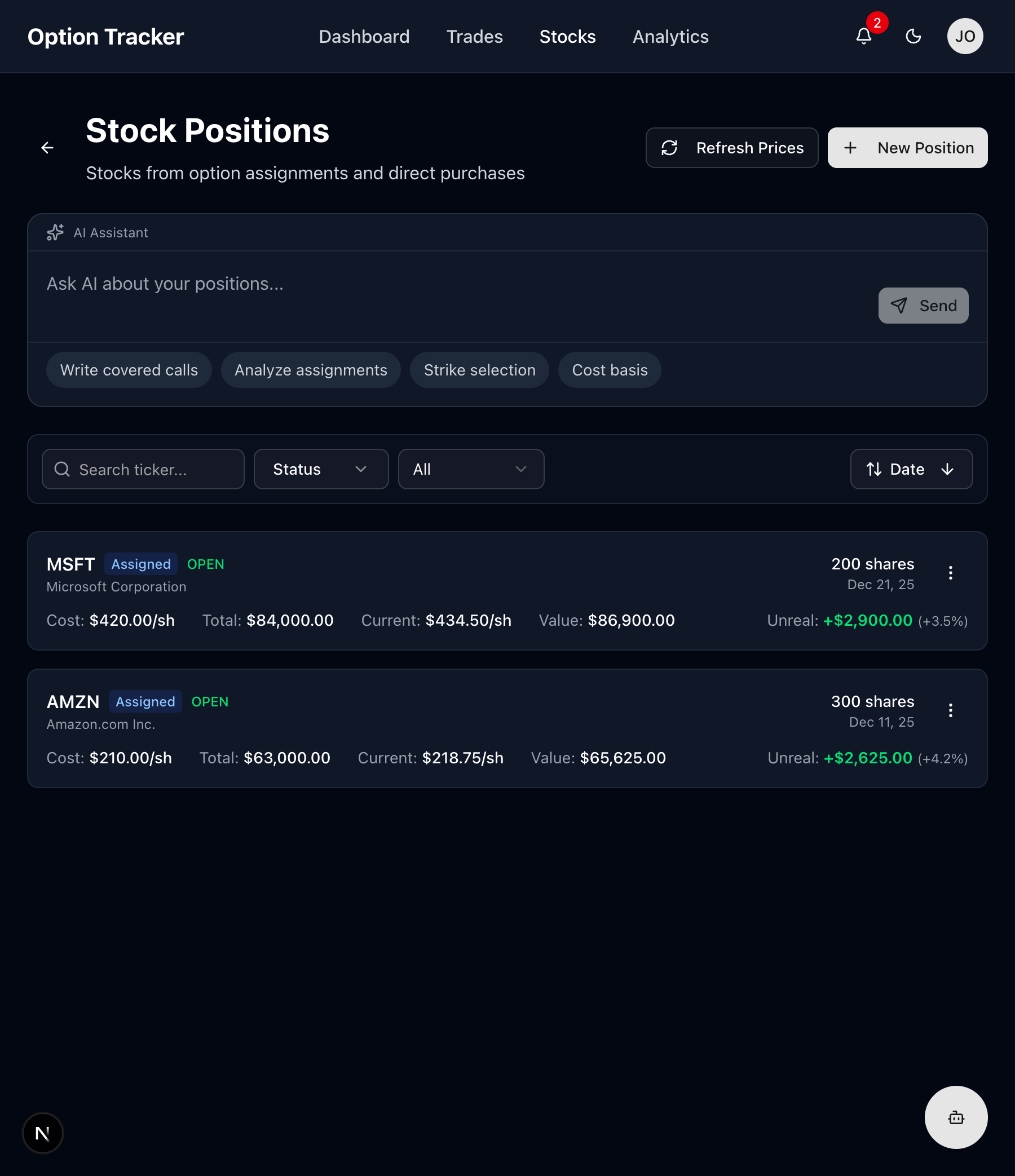
Position Card Information
Each position displays:
- Ticker & Company - Stock symbol and company name
- Source - How you acquired it (Assigned or Direct Purchase)
- Status - OPEN or CLOSED
- Shares - Number of shares owned
- Acquisition Date - When you received the shares
- Cost Basis - Your average cost per share
- Total Cost - Total investment amount
- Current Price - Real-time stock price
- Current Value - Total market value
- Unrealized P&L - Paper profit/loss with percentage
How Stock Positions Are Created
From Option Assignment
When a sold option (put or call) is assigned:
-
Sold Put Assignment - You're obligated to buy shares at the strike price
- Position created with strike price as cost basis
- Premium received reduces your effective cost basis
-
Sold Call Assignment - Your shares are called away
- Stock position is closed
- Realized P&L calculated from sale
Direct Purchase
You can also manually add stock positions:
- Click "+ New Position"
- Fill in the purchase details
- Track it alongside your assigned positions
Adding a New Stock Position
Click the "+ New Position" button to record a direct stock purchase.
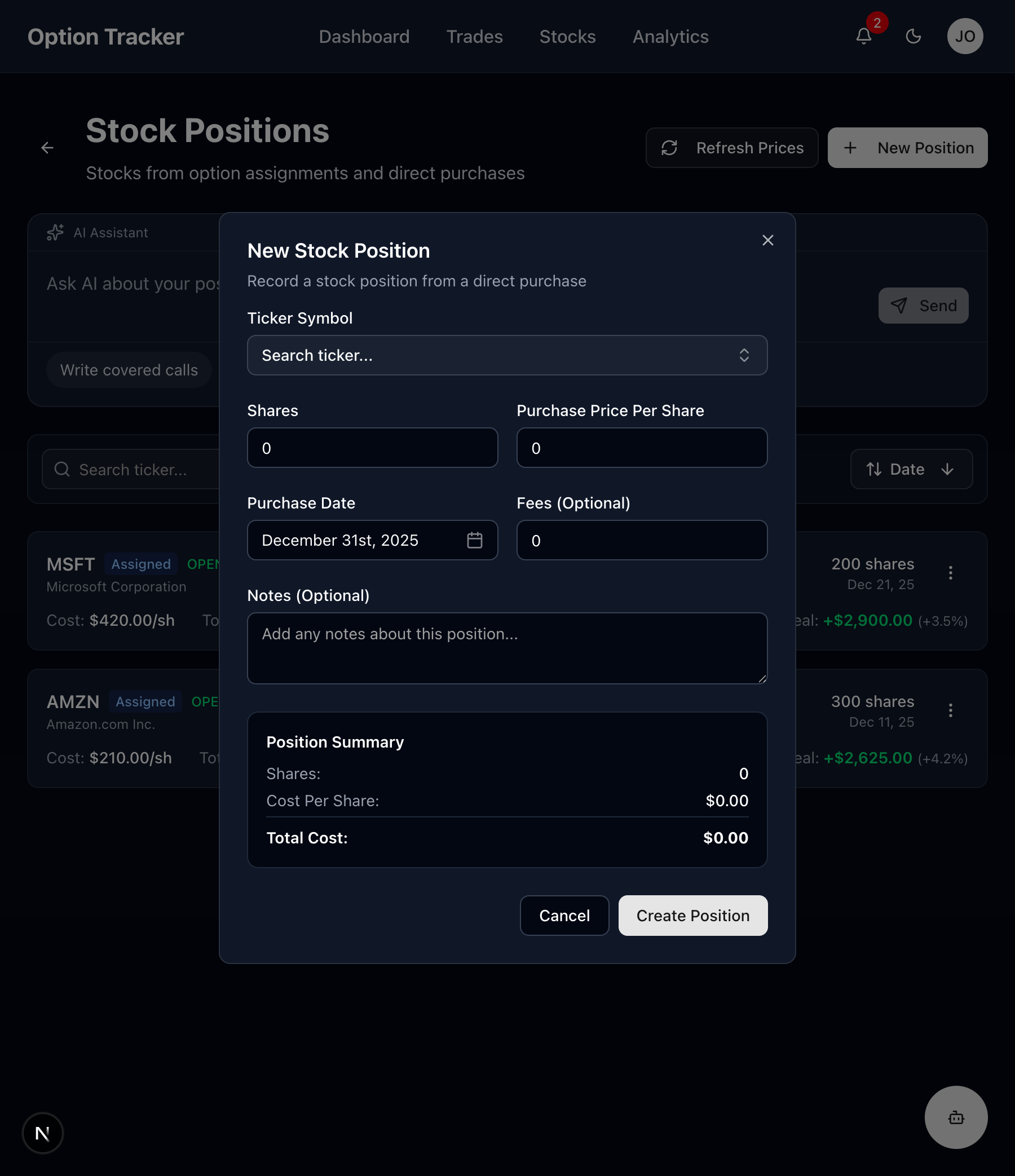
Step-by-Step: Creating a Position
-
Ticker Symbol - Search and select the stock
-
Shares - Number of shares purchased
-
Purchase Price Per Share - Your cost per share
-
Purchase Date - When you bought the stock
-
Fees (Optional) - Any broker fees or commissions
-
Notes (Optional) - Add context about the purchase
-
Review the Position Summary showing:
- Total shares
- Cost per share
- Total cost basis
-
Click "Create Position" to save
Managing Stock Positions
Position Actions Menu
Click the three-dot menu on any position to access actions:
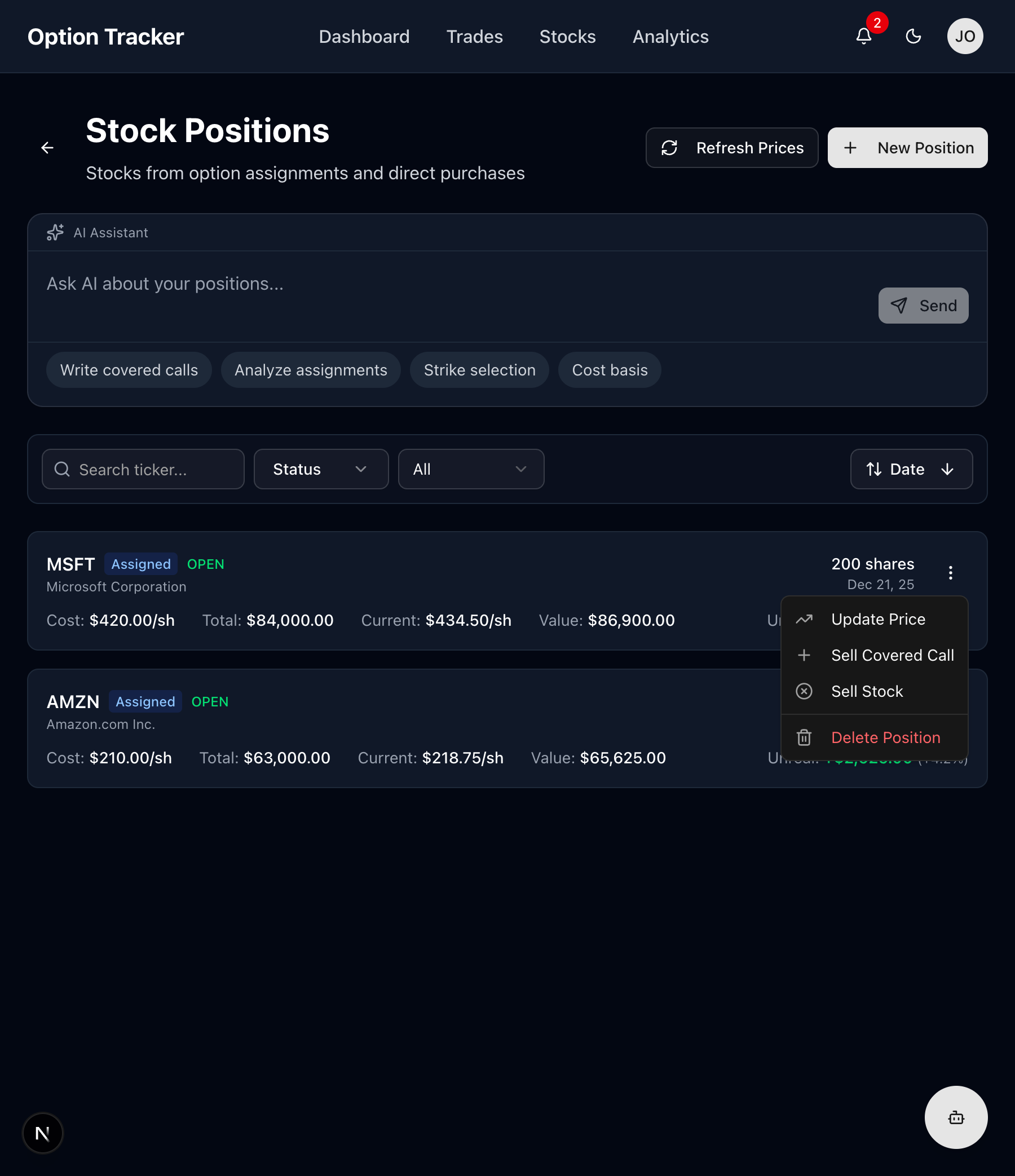
Available actions:
- Update Price - Refresh the current market price
- Sell Covered Call - Write a call against your shares
- Sell Stock - Close the position by selling
- Delete Position - Remove the record
Updating Prices
Stock prices update automatically, but you can manually refresh:
- Click "Refresh Prices" at the top to update all positions
- Or use the menu on individual positions
Selling Stock (Closing Position)
When you sell your shares:
- Click the position menu
- Select "Sell Stock"
- Enter:
- Selling Price per Share
- Closing Fees
- Click "Sell Stock"
Your realized P&L is calculated:
P&L = (Selling Price - Cost Basis) × Shares - Fees
Understanding Cost Basis
For Assigned Positions
When assigned from a sold put, your cost basis is:
Cost Basis = Strike Price - Premium Received per Share
Example:
- Sold 1 AAPL $150 Put for $3.00 premium
- Assigned 100 shares at $150
- Effective cost basis: $150 - $3.00 = $147.00/share
For Direct Purchases
Cost basis equals your purchase price plus any fees divided by shares.
With Covered Calls
Premium from covered calls further reduces your cost basis:
Adjusted Basis = Original Basis - (Total CC Premium / Shares)
AI Assistant for Stocks
The stocks page has AI suggestions tailored to position management:
- "Write covered calls" - Get help selecting strike prices
- "Analyze assignments" - Review your assignment history
- "Strike selection" - Optimize covered call strikes
- "Cost basis" - Understand your position costs
Filtering and Searching
Use the filter bar to find specific positions:
- Search - Filter by ticker symbol
- Status - Show Open, Closed, or All positions
- Type - Filter by Assigned or Direct Purchase
- Date - Sort by acquisition date
Best Practices
- Track all positions - Include both assigned and direct purchases
- Monitor cost basis - Understand your break-even points
- Consider covered calls - Generate income on holdings
- Review regularly - Check unrealized P&L for exit decisions
- Document strategy - Use notes to track your plan for each position
Position Workflow
Here's a typical workflow for a wheel strategy position:
- Sell Put - Collect premium, willing to own at strike
- Get Assigned - Stock position created automatically
- Sell Covered Calls - Generate income while holding
- Get Called Away or Sell Stock - Exit the position
- Repeat - Start the cycle again
Next Steps
- Learn about Covered Calls to generate income
- Analyze your performance in Analytics
- Review your Settings for preferences