Rolling Trades
Learn how to roll option positions to new strikes and expirations while tracking your entire roll chain and net premium collected.
Rolling an option position means closing your current position and immediately opening a new one with different terms (strike price and/or expiration date). This is a common strategy for managing positions that are approaching expiration or have moved against you.
Option Tracker makes rolling easy with a dedicated workflow that links your trades together, calculates net credit/debit, and tracks cumulative premium across your entire roll chain.
When to Roll an Option
Common reasons to roll include:
- Avoid Assignment: Roll out-of-the-money options to collect more premium
- Defend a Position: Roll to a different strike when the stock moves against you
- Extend Duration: Roll to a later expiration to give your thesis more time
- Capture More Premium: Roll up and out for a net credit
Rolling a Trade
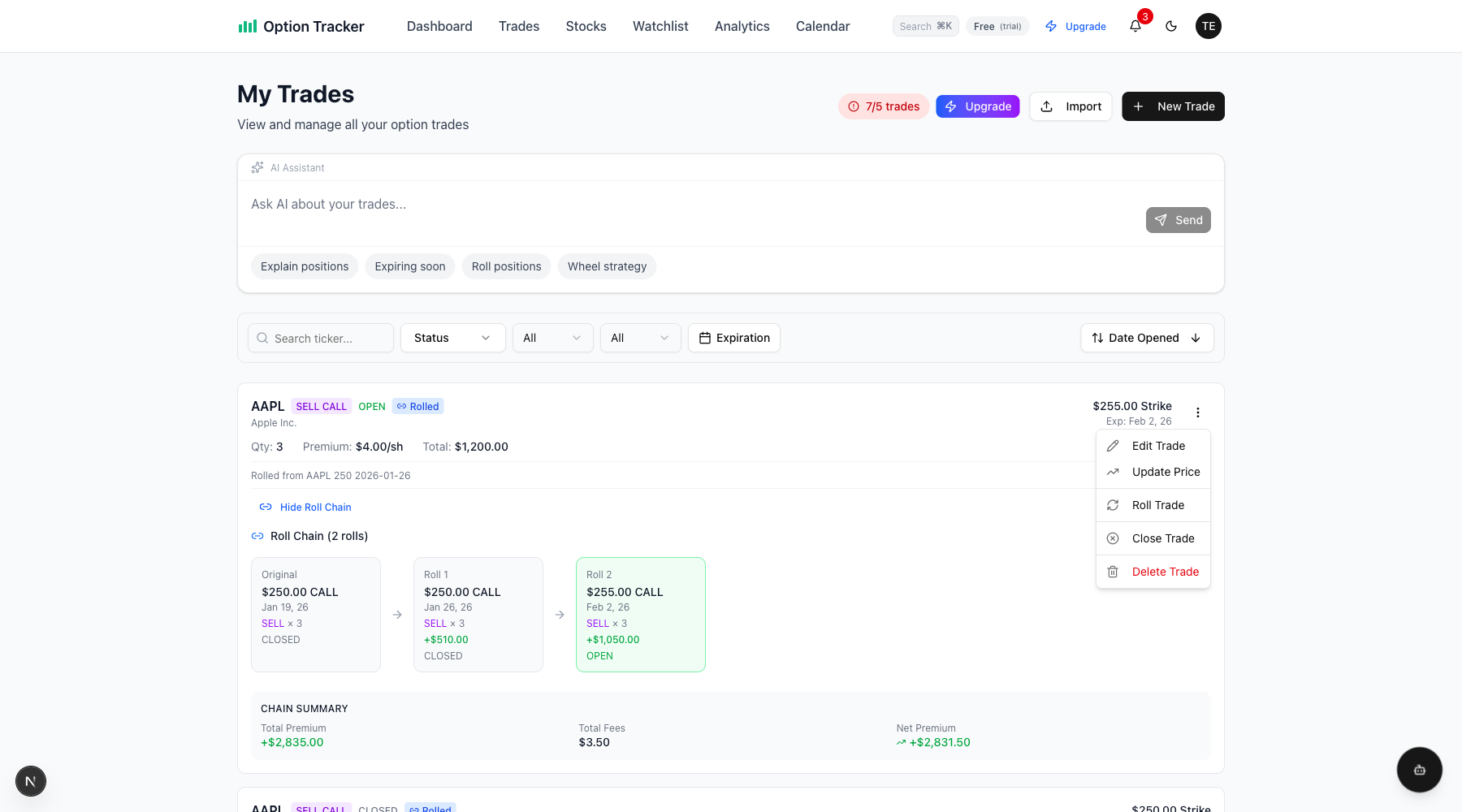
Step 1: Open the Roll Dialog
From any open trade, click the three-dot menu and select "Roll Trade".
Step 2: Complete the Roll Form
The Roll Trade dialog has two sections:
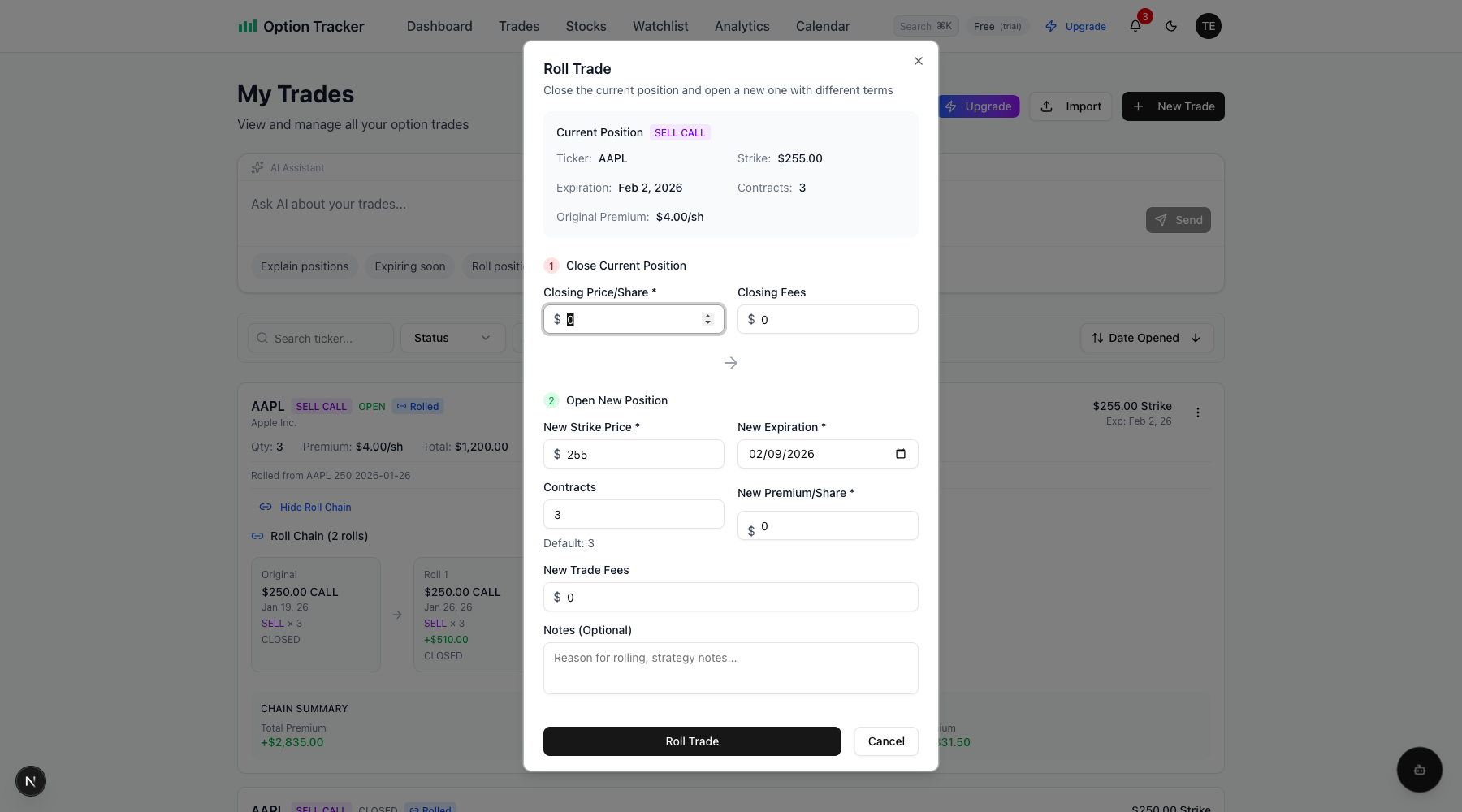
Section 1: Close Current Position
- Closing Price/Share: The price you're paying/receiving to close the current position
- Closing Fees: Any broker fees for the closing transaction
Section 2: Open New Position
- New Strike Price: The strike for your new position
- New Expiration: When the new option expires
- Contracts: Number of contracts (defaults to same as current position)
- New Premium/Share: Premium for the new position
- New Trade Fees: Broker fees for opening the new position
- Notes: Optional notes about why you're rolling
Step 3: Submit the Roll
Click "Roll Trade" to execute. The system will:
- Close your current position at the closing price
- Create a new position with your specified terms
- Link the new trade to the original via a roll chain
- Calculate and display the net credit or debit
Understanding Net Credit vs. Net Debit
When you roll a position, you either receive a net credit (money in) or pay a net debit (money out).
For SELL Positions (Covered Calls, Cash-Secured Puts)
Net Credit/Debit = New Premium Received - Closing Cost
- Net Credit: You received more premium than you paid to close (rolling for a credit)
- Net Debit: You paid more to close than you received (rolling at a loss)
For BUY Positions (Long Calls, Long Puts)
Net Credit/Debit = Closing Proceeds - New Premium Paid
- Net Credit: You sold the old position for more than the new one cost
- Net Debit: The new position cost more than you received from closing
Viewing Roll Chains
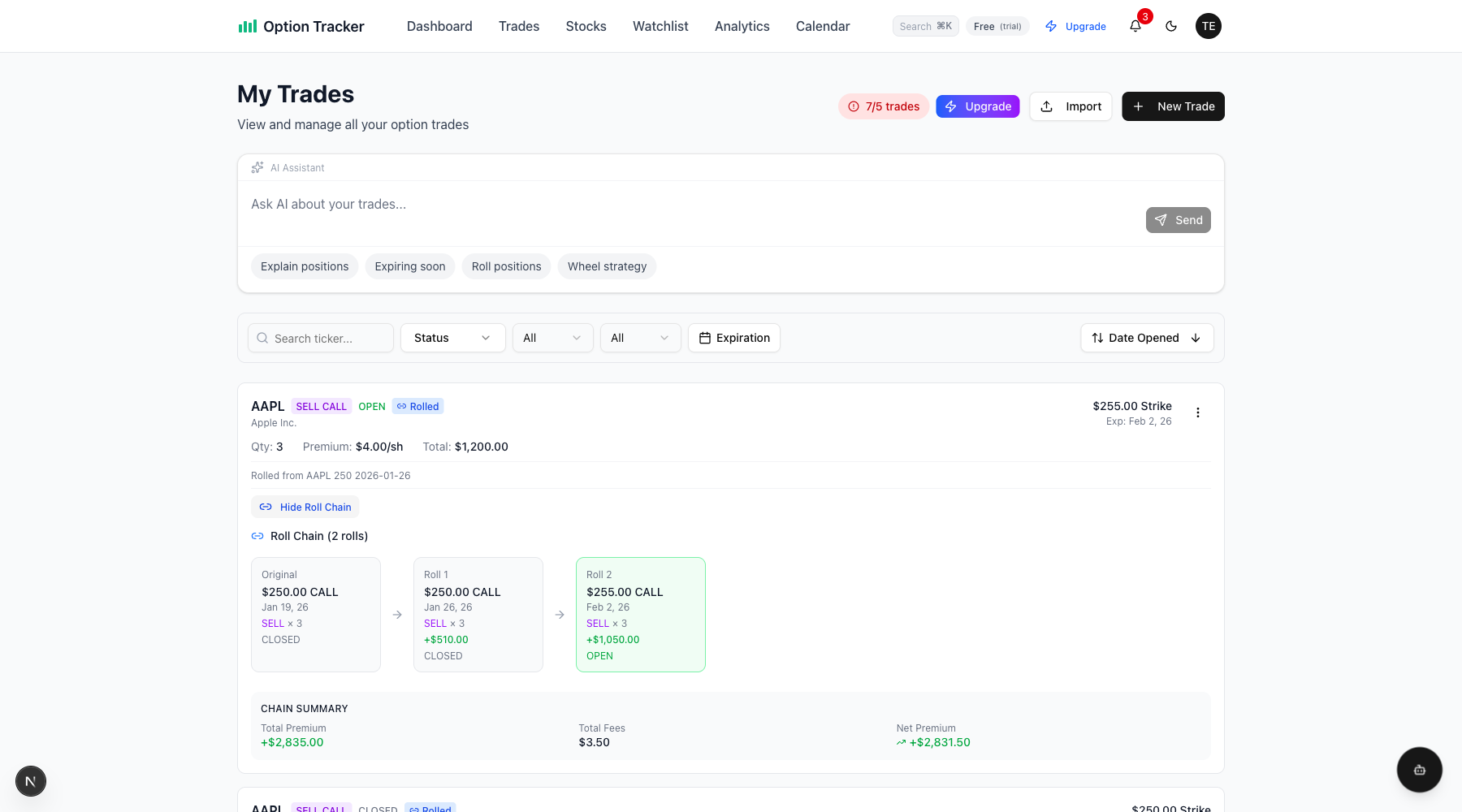
Trades that are part of a roll chain display a "Rolled" badge and show the chain lineage.
Roll Chain Features
- "Rolled" Badge: Visual indicator on trade cards that are part of a chain
- Roll Chain Lineage: Shows "Rolled from [ticker] [strike] [expiration]"
- View Roll Chain Button: Expand to see the full chain visualization
Chain Visualization
Click "View Roll Chain" to expand the full history:
- Original: Your first position in the chain
- Roll 1, Roll 2, etc.: Subsequent rolls with net credit/debit displayed
- Status Indicators: Shows which positions are CLOSED vs. OPEN
Chain Summary
At the bottom of each chain view, you'll see:
| Metric | Description | |--------|-------------| | Total Premium | Sum of all premiums collected across the chain | | Total Fees | All broker fees paid | | Net Premium | Total premium minus fees (your actual profit/loss) |
Roll Chain Example
Here's a typical roll chain for a covered call:
- Original: Sold AAPL $250 Call expiring Jan 19 for $4.25/share
- Roll 1: Closed at $1.70, opened $250 Call Jan 26 for $3.50/share (+$180 net credit)
- Roll 2: Closed at $0.50, opened $255 Call Feb 2 for $4.00/share (+$350 net credit)
Chain Summary: +$2,835 total premium collected across all positions
Cost Basis Calculation for Assigned Rolled Puts
When you roll a cash-secured put and it eventually gets assigned, Option Tracker correctly calculates your cost basis using the entire roll chain premium, not just the final trade's premium.
How It Works
For a rolled CSP that gets assigned:
Cost Basis = Strike Price - Net Premium from Entire Chain
Where Net Premium from Chain = All premiums received - All closing costs paid
Example: Rolling at a Loss
Consider this scenario:
| Trade | Action | Amount | |-------|--------|--------| | Original CSP | Sold $220 PUT for $3/sh | +$300 | | Roll (close) | Bought back at $5/sh | -$500 | | New CSP | Sold $215 PUT for $4/sh | +$400 |
Net Premium: $300 - $500 + $400 = $200 ($2/share)
If assigned on the $215 PUT:
- Cost Basis: $215 - $2 = $213/share
Viewing Cost Basis in Assignment Dialog
When assigning a rolled put, the dialog shows:
- "Roll chain" badge indicating the trade is part of a roll chain
- Net Premium (from chain) showing the calculated net premium
- Cost Basis per Share using the full chain calculation
- Number of rolls in the chain
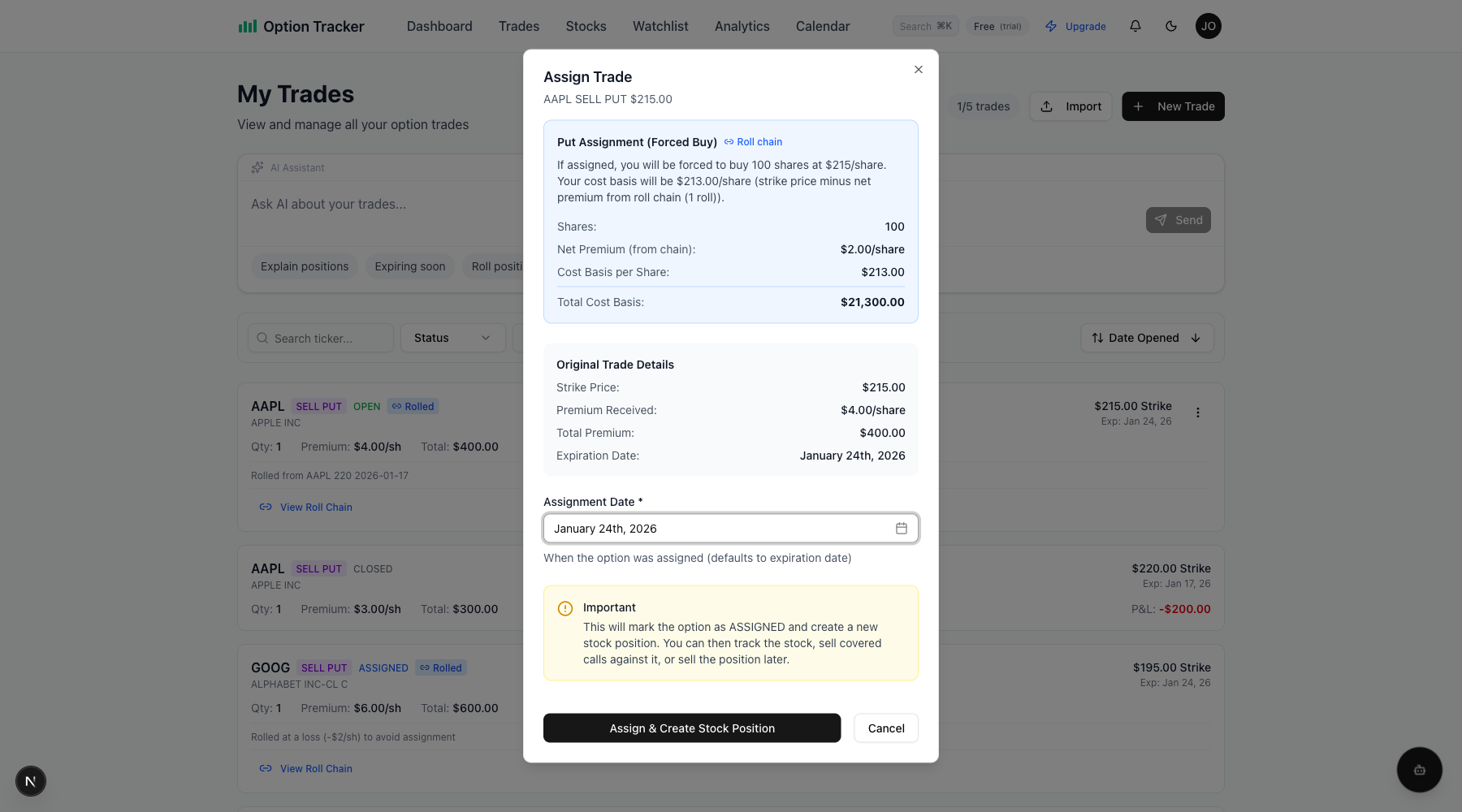
This ensures your stock position has the accurate cost basis for tracking P&L and tax reporting.
Tips for Successful Rolling
- Roll for Credit When Possible: Try to collect net premium on each roll
- Consider Strike Adjustment: Rolling up (calls) or down (puts) can help manage assignment risk
- Watch Time Decay: Roll before expiration week when theta decay accelerates
- Track Your Chain: Use the chain summary to know your break-even point
- Document Your Reasoning: Use the notes field to record why you rolled
Rolling from Any Trade in the Chain
You can view the complete roll chain from any trade in the chain - not just the most recent one. Click "View Roll Chain" on any linked trade to see the full history.
Next Steps
- Learn about Managing Trades for other trade actions
- Understand Stock Positions if you get assigned
- Track performance in Analytics