Trade Journal
Document your trading decisions with rich notes and image attachments for every trade.
The Trade Journal feature helps you document your trading decisions, capture market conditions, and review your thought process over time. Every trade can have rich text notes and image attachments.
Journal Overview
Access your journal from the sidebar by clicking Journal. This page shows all trades that have notes attached.
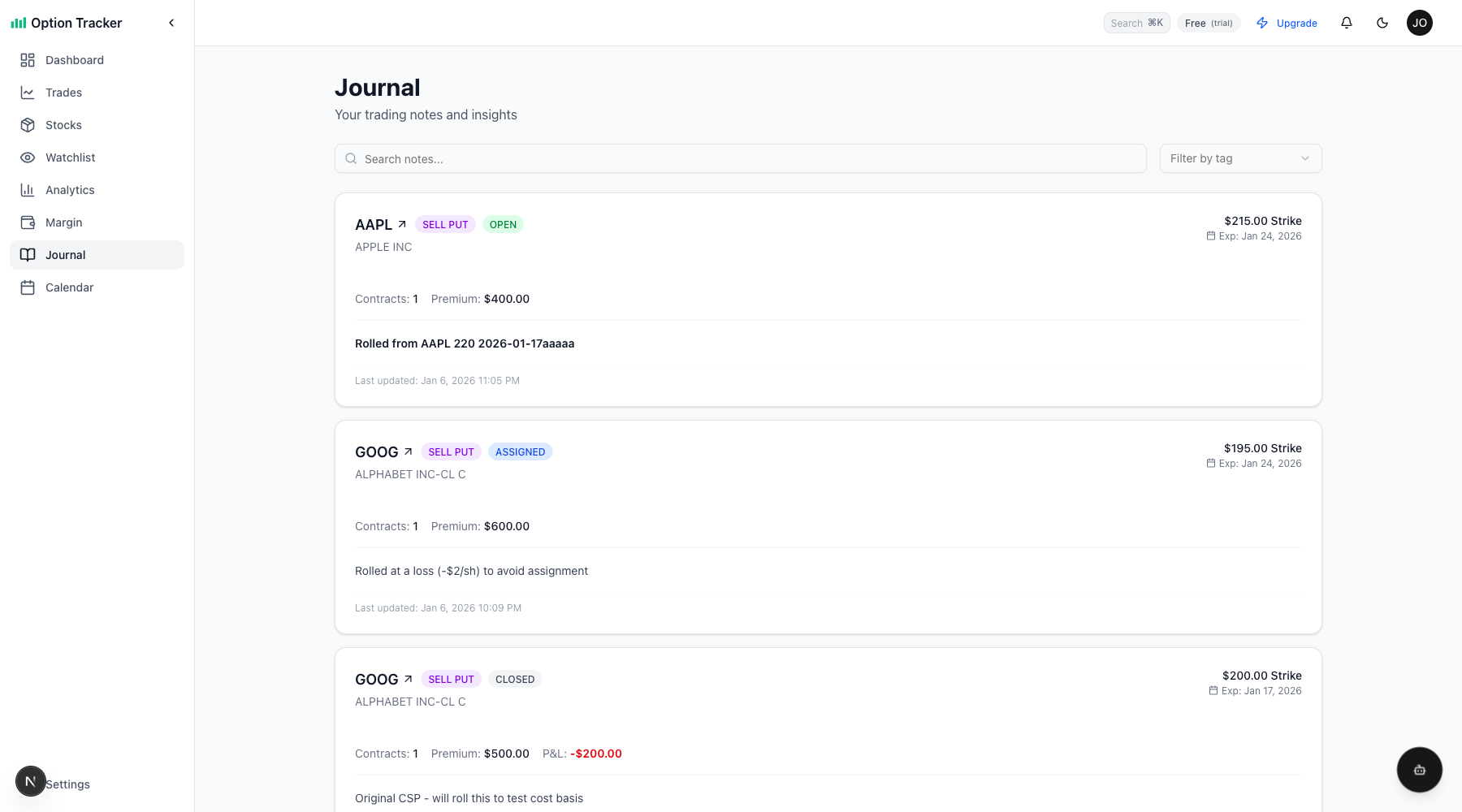
The journal displays:
- Trade Summary - Ticker, type (SELL PUT, etc.), and status
- Position Details - Strike price, expiration, contracts, and premium
- Notes Preview - Your notes rendered with formatting
- Last Updated - When the notes were last modified
Search and Filter
Use the search bar to find notes containing specific text. Filter by tags to organize your journal entries by theme (e.g., "earnings play", "wheel strategy", "assignment risk").
Adding Notes to Trades
Notes are added when creating or editing a trade.
From the Trades Page
- Navigate to Trades in the sidebar
- Click the action menu (three dots) on any trade card
- Select Edit Trade
- Scroll down to the Notes section
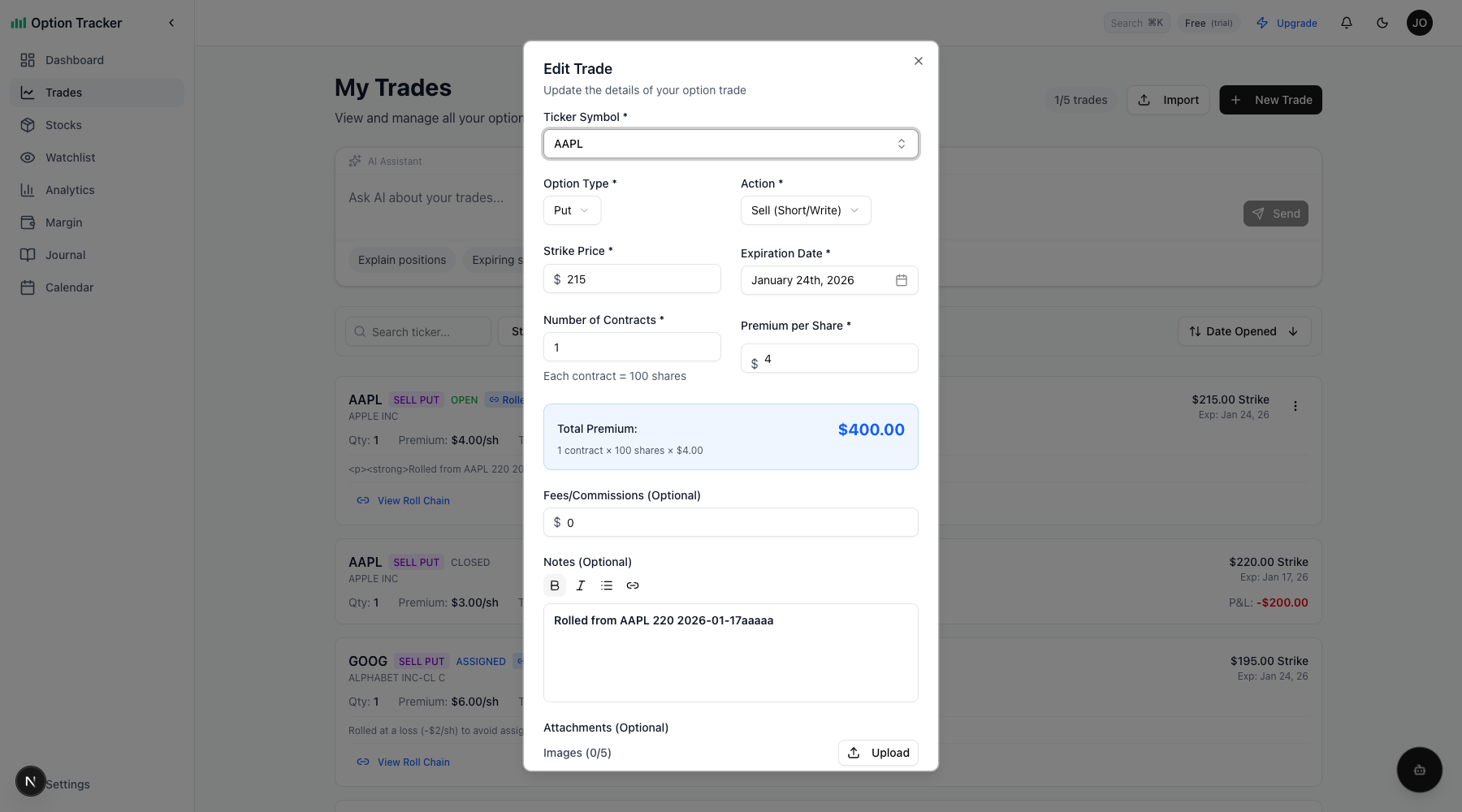
Rich Text Editor
The notes field includes a WYSIWYG (What You See Is What You Get) editor with formatting options:
| Button | Function | Keyboard Shortcut |
|--------|----------|-------------------|
| B | Bold text | Ctrl+B / Cmd+B |
| I | Italic text | Ctrl+I / Cmd+I |
| List | Bullet list | - |
| Link | Add hyperlink | - |
Formatting Examples
Bold text for emphasis on key points:
- Entry reason
- Exit target
- Stop loss level
Italic text for market observations or quotes.
Bullet lists for trade criteria:
- Technical setup
- Fundamental catalyst
- Risk/reward ratio
Links to reference external sources:
- Earnings reports
- News articles
- Chart analysis
Image Attachments
Attach up to 5 images per trade to capture:
- Chart screenshots
- Option chain snapshots
- Technical indicator readings
- News headlines
Uploading Images
- In the Edit Trade dialog, scroll to Attachments
- Click Upload or drag and drop images
- Supported formats: JPEG, PNG, GIF, WebP
- Maximum file size: 5MB per image
Image Best Practices
- Chart screenshots - Capture the setup at entry
- Before/After - Document how the trade evolved
- Option chain - Record IV and Greeks at entry
- Technical levels - Mark support/resistance
Journal Workflow
Entry Journaling
When opening a trade, document:
- Why you entered - What's the thesis?
- Technical setup - Chart patterns, indicators
- Risk management - Max loss, exit criteria
- Target - Profit target or management plan
Example entry note:
Entry Thesis: AAPL oversold after earnings, selling put at support

- RSI below 30 on daily
- 200 DMA acting as support at $175
- IV rank 45%, good premium
- Will roll if tested, max loss 2 rolls
Exit Journaling
When closing a trade, add:
- Outcome - Win/loss and why
- What worked - Validate your thesis
- What to improve - Lessons learned
- Follow-up - Next steps or adjustments
Example exit note:
Closed for 80% of max profit

- Stock bounced from support as expected
- Held through minor pullback
- Next time: consider closing earlier at 50% profit
- Looking for next entry on pullback to $180
Reviewing Your Journal
Regularly review your journal to:
- Identify patterns - What setups work best for you?
- Learn from losses - What went wrong?
- Track improvement - Are you making the same mistakes?
- Build confidence - Document your winning process
Weekly Review
Set aside time each week to:
- Read through recent journal entries
- Note any repeated mistakes
- Celebrate successful trades
- Identify areas for improvement
Monthly Analysis
Use the Analytics page alongside your journal to:
- Compare win rates by strategy
- Review P&L trends
- Correlate notes with outcomes
Tips for Effective Journaling
- Be specific - "Stock looked weak" vs "Failed to hold $180 support with high volume"
- Include numbers - Entry price, target, stop loss
- Write immediately - Document while memory is fresh
- Be honest - Record mistakes, not just wins
- Use screenshots - A picture captures what words can't
- Review regularly - A journal only helps if you read it
Integration with Other Features
Roll Chain Notes
When you roll a trade, notes from the original position are preserved. Add new notes to document:
- Why you rolled
- Net credit/debit
- New management plan
Assignment Notes
When a CSP is assigned, your original notes carry forward to the stock position, maintaining context for covered call decisions.
Analytics Connection
Your journaled trades appear in Analytics, letting you filter and analyze performance by documented strategy or setup type.